Google has been planning to integrate its duo video chat on the pixel, nexus and android one phones for a couple of months. The company is rolling out duo video chat inside the normal phone dialer app, which makes the app a form of android facetime, According to a report at Android Police.
By allowing Duo on android mobile phones screen sharing is so easy now and it will help us in more daily task as we don’t really need laptops to do it specifically.
Following link will help you to understand android duo.
https://youtu.be/8WTlea7gIXQ
According to a report on Android Police, the duo button is showing up in some customers’ regular phone dialer app. while you tap the video call button, your phone launches the duo app and activates your camera.
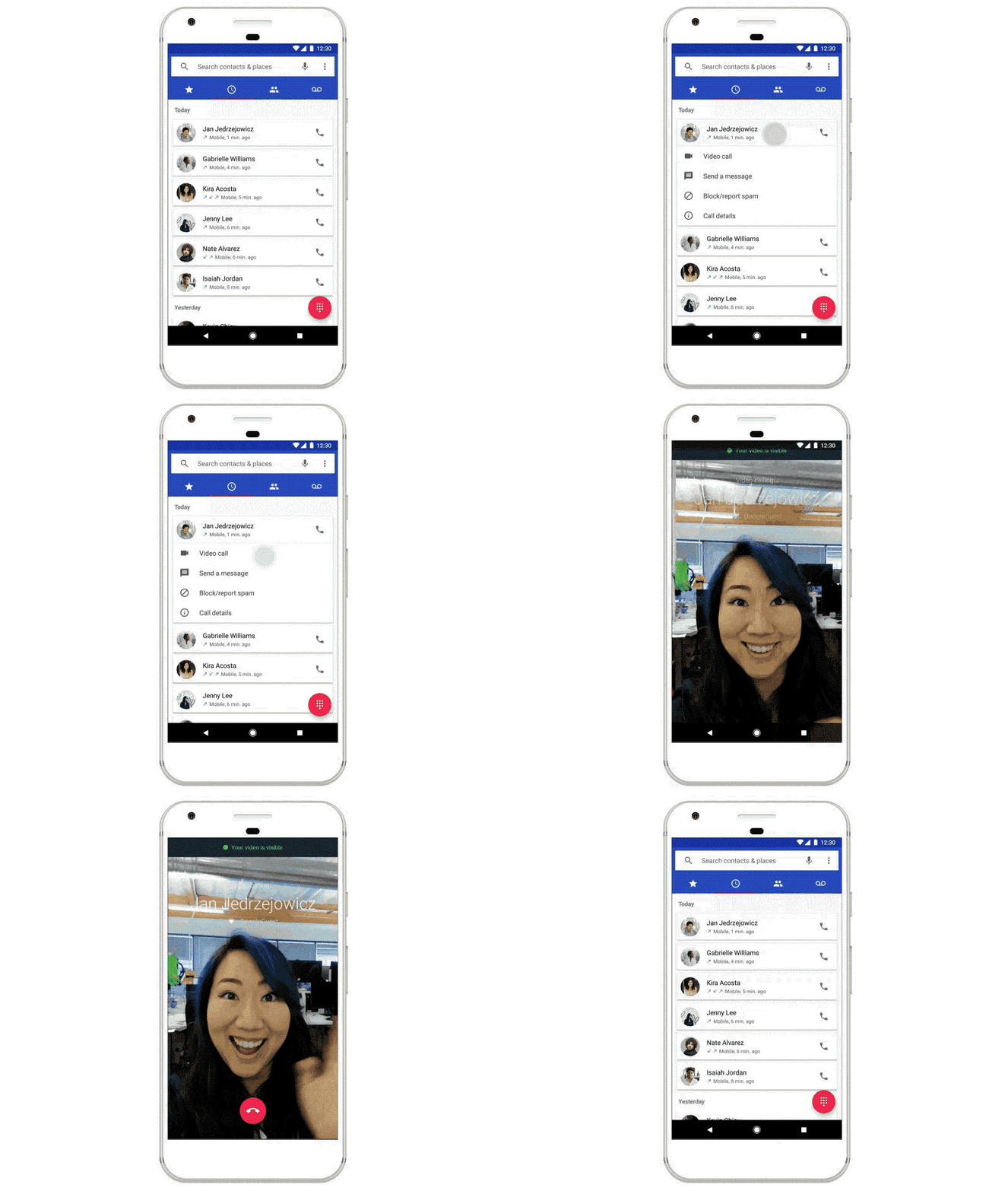
The person you are calling can then accept or decline the incoming video call. Android police note that the initial phone call will disconnect when the duo video chat takes over and that you will have two entries on your call log, one for the initial phone call and one for the video call.
There are some points that we do need to discuss in order to get to know more about Duo. Lets have a little introduction with zoom and duo and how these both are different from each other based on their features.
Duo

This is the platform which is available to call or video call other person we want to. It can be both official and personal. The latest add to this app is that it have allowed screen sharing feature into it so we can share our mobile phone screen along with our video call shat.
Duo only allow the maximum participant rate to be 12 not more than this. Still there are some features which are not same and helpful as zoom. lets check the given below link by clicking it. You will get to know how is this app is working.
https://youtu.be/8syVP5aeJoA
Zoom

Zoom is the platform which is old and carried more reliable features for us as compared to duo. The number of participant zoom is allowing can be 100 or more than it. so duo still need time and work to make a comparison with zoom.
We are using zoom for official and personal both use and it is also using in school and for higher education in educator sectors worldwide.
Zoom is more easy to use and also more simple as compared to duo. Click the link below to check how this app is helping us in our daily life and how to use it.
https://youtu.be/fMUxzrgZvZQ
FAQS
Q. What is meant by Duo call on android cell phone?
Ans. Yes, we can share screen while we are on a call. we can share photos and videos.
Q. What are the disadvantages of Duo call?
Ans. For Duo call the main disadvantage of this is to do sign up.
Q. What is meant by screen mirroring?
Ans. Screen mirroring allows you to view photos and videos on TV screen.
Q. What do we see on screen sharing or screen mirroring?
Ans. we will exactly see the same thing we are playing on our phone device. we can see exactly the same things it can watching videos, photos and other stuff.
Q. What if i am unable to share my screen Duo?
Ans. It might be happen because your internet is slow or not available or if you are using the older version of the Duo on your mobile phone. For this please check your internet connection first and than update your app to the latest version available at that time so it can work properly.